---
title: Connecting Your Student Data via WONDE
description: Connect your Top Marks account to WONDE to import your student data safely.
---
[Skip to content](https://help.topmarks.ai/knowledge/connecting-your-student-data-via-wonde#main-content)
.png?width=660&height=92&name=help-centre-banner-J-2x%20(2).png)
Open main navigation
Close main navigation
- [Get in touch](https://help.topmarks.ai/knowledge/getting-support)
[Get in touch](https://help.topmarks.ai/knowledge/getting-support?hsLang=en-gb)
How can we help you?
- There are no suggestions because the search field is empty.
1. [Top Marks AI Help Centre](https://help.topmarks.ai/knowledge?hsLang=en-gb)
2. [Getting Started](https://help.topmarks.ai/knowledge/getting-started?hsLang=en-gb)
# Connecting Your Student Data via WONDE
## Top Marks integrates with WONDE to import your student data (name, classes and year group only) directly from your school's management information system (MIS), saving you from adding students manually.
### **Before You Start**
Before initiating a WONDE connection, make sure:
- Your school's DPIA has been completed and approved
- Your data manager or IT lead is available to approve the connection request (they will receive a notification)
### **Starting the Integration**
Go to [**My Students**](https://app.topmarks.ai/students) **→ Import from WONDE**.
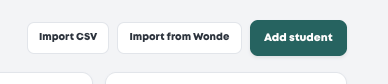
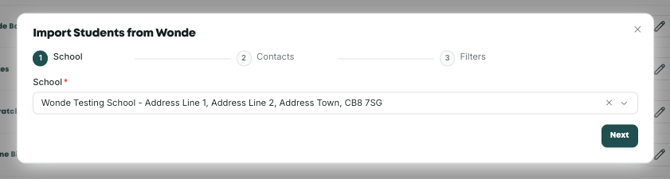
The setup is a three-step process:
1. Enter your school name
2. Enter the contact details for the person at your school who will approve the connection (typically your data manager or IT lead)
3. Select the year groups you want to import
You can select multiple year groups - you don't need to import the entire school.
****
### **Approval and Sync**
Once submitted, your data manager will receive a notification to approve the connection. This usually takes around a day as they complete their due diligence. Once approved, your selected year groups will appear in the **My Students** area automatically.
**Resyncing**
Should you need to resync the WONDE integration for whatever reason (new school year, adding further year groups, first attempt didn’t work) you can do so via the same area on the software.
Simply navigate to [**My Students**](https://app.topmarks.ai/students) **→ Click the three dots next to Create Student → Import from WONDE**.
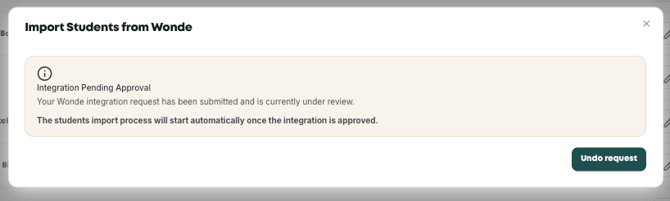
Once a WONDE integration has already been completed, this is the view you will be presented with. You can resync students, or change which year groups are imported, without having to complete the WONDE integration again.
### **One School Per Account**
Each Top Marks account connects to one school's MIS. If you are managing a trust with multiple schools, each school will need its own account. You can then use the **Access Management** feature to switch between them from a single login.
*Still unsure? The support chat in the bottom-right corner of the website connects you directly to a real person on the Top Marks team – not an AI bot, ironically! Don't hesitate to reach out at any point.*
- [Getting Started](https://help.topmarks.ai/knowledge/getting-started?hsLang=en-gb)
- [Marking & Feedback](https://help.topmarks.ai/knowledge/marking-feedback?hsLang=en-gb)
- [Accounts, Data & Security](https://help.topmarks.ai/knowledge/accounts-data-security?hsLang=en-gb)
- [Troubleshooting](https://help.topmarks.ai/knowledge/troubleshooting?hsLang=en-gb)
- [Integrations](https://help.topmarks.ai/knowledge/integrations?hsLang=en-gb)
- [FAQs](https://help.topmarks.ai/knowledge/faqs?hsLang=en-gb)
[](https://help.topmarks.ai/?hsLang=en-gb)
[mailto:hello@topmarks.ai](mailto:hello@topmarks.ai)
Copyright © 2026, Top Marks AI
```json
{
"@context" : "https://schema.org",
"@type" : "VideoObject",
"caption" : {
"@type" : "MediaObject",
"contentUrl" : "https://help.topmarks.ai/media-transcripts/484960203989/en.vtt",
"inLanguage" : "en",
"name" : "en Captions"
},
"contentUrl" : "https://148370575.fs1.hubspotusercontent-eu1.net/hubfs/148370575/video_assets/484960203989/inherited/web_optimized.mp4",
"dateModified" : "2026-10-05T10:07:24.945Z",
"duration" : "PT2M13S",
"height" : 1080,
"name" : "Initiate WONDE Integration for My Students",
"thumbnailUrl" : "https://148370575.fs1.hubspotusercontent-eu1.net/hubfs/148370575/Initiate%20WONDE%20Integration%20for%20My%20Students.mp4/medium.jpg",
"uploadDate" : "2026-10-05T10:07:14.399Z",
"width" : 1788
}
```